

What is Software ?
Ans: Software refers to a collection of programs, instructions, or data used to operate computers and execute specific tasks. It encompasses all the intangible components of a computer system that are not hardware, which means it’s the non-physical part of a computer.
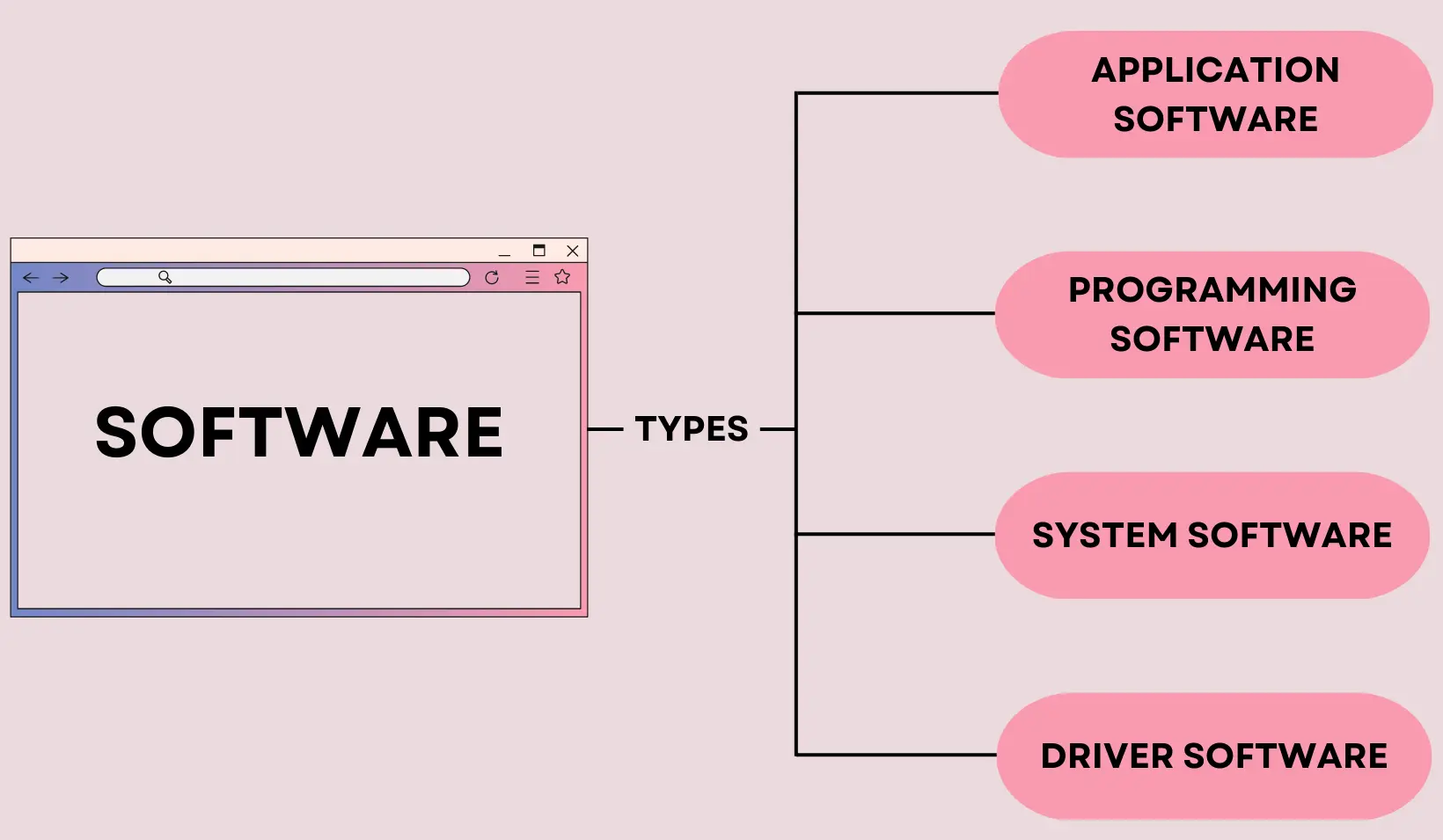
Type of Software ?
Ans: 4 Types of software
- Application Software
- Programing Software
- System Software
- Driver Software
::::: APPLICATION SOFTWARE :::::
Application software refers to programs or software designed to perform specific tasks or applications for users. Unlike system software, which helps run the computer and its hardware, application software serves various purposes, such as word processing, spreadsheets, databases, graphic design, web browsers, and more. These programs are created to meet specific user needs, offering functionalities to accomplish tasks efficiently, from simple activities like writing documents to complex tasks like designing intricate graphics or analyzing data.
Example Of Application Software::
Microsoft Word: A word processing software used for creating documents, reports, letters, and other text-based materials.
Adobe Photoshop: A graphic editing software used for image editing, creating digital art, and manipulating photos.
Google Chrome: A web browser used to access and navigate the internet.
Excel: A spreadsheet software used for data entry, manipulation, and analysis, often used in finance, accounting, and scientific research.
Adobe Illustrator: A vector graphics editor used for creating illustrations, logos, and other artwork.
Skype: An application used for video calling, voice calling, and instant messaging.
QuickBooks: Accounting software designed for small and medium-sized businesses to manage payroll, inventory, and financial transactions.
AutoCAD: Computer-aided design software used by architects, engineers, and designers to create precise 2D and 3D drawings.
iTunes: Media player and library application used for organizing and playing music and videos on computers and mobile devices.
Slack: Collaboration software used for team communication, file sharing, and project management in workplaces.
These are just a few examples; there are countless other application software tailored to various needs and industries.
::::: PROGRAMMING SOFTWARE :::::
Programming software refers to a set of tools used by developers and programmers to create, debug, maintain, and test computer programs or software applications. These software tools provide an environment for writing, editing, compiling, and debugging code. They include various components and utilities that assist programmers in the software development process.
Some key types of programming software include:
- Text Editors and Integrated Development Environments (IDEs): Text editors like Sublime Text, Visual Studio Code, or IDEs like Eclipse, IntelliJ IDEA, and Visual Studio provide comprehensive environments with features such as code highlighting, debugging tools, and project management.
- Compilers and Interpreters: Compilers (e.g., GCC for C/C++) and interpreters (e.g., Python interpreter) translate high-level programming languages into machine code or execute code directly without prior compilation.
- Debuggers: Tools like GDB for C/C++ or pdb for Python help programmers identify and fix errors in their code by allowing them to step through code execution and inspect variables.
- Version Control Systems (VCS): Git, Subversion (SVN), and Mercurial are examples of VCS that assist developers in managing changes to source code over time, facilitating collaboration and tracking modifications.
- Libraries and Frameworks: Software development kits (SDKs), libraries (like React or jQuery), and frameworks (such as Django or Angular) provide pre-written code or structures to streamline development in specific languages or for certain tasks.
These tools collectively aid in writing code efficiently, managing projects, debugging, and ensuring the quality and functionality of the final software product. They vary in complexity and features and are selected based on the programming language, project requirements, and personal preferences of developers.
Example Of Programming Software::
Visual Studio: A comprehensive integrated development environment (IDE) developed by Microsoft. It supports multiple programming languages like C#, C++, Visual Basic, F#, and more. It offers tools for coding, debugging, and deploying applications for Windows, Android, iOS, and web platforms.
Eclipse: An open-source IDE primarily used for Java development but can be extended through plugins to support other languages like C/C++, Python, PHP, and more. It’s known for its extensibility and community-contributed plugins.
Xcode: Apple’s integrated development environment for macOS, used to develop software for macOS, iOS, iPadOS, watchOS, and tvOS. It primarily supports Swift and Objective-C programming languages.
Android Studio: The official IDE for Android app development, based on IntelliJ IDEA. It provides tools for building Android applications using Kotlin or Java.
PyCharm: An IDE specifically designed for Python development. It offers features like code analysis, debugging, and support for web development frameworks like Django and Flask.
NetBeans: An open-source IDE that supports various languages like Java, JavaScript, PHP, and C/C++. It provides features for developing desktop, mobile, and web applications.
Sublime Text: A sophisticated text editor used for coding in various languages. It supports customization through plugins and has a minimalist interface with powerful editing capabilities.
Atom: Another text editor developed by GitHub. It’s highly customizable, supports multiple languages, and has a thriving community contributing to its functionality through packages.
IntelliJ IDEA: A popular IDE primarily used for Java development but also supports other languages like Kotlin, Groovy, Scala, and more. It offers features for efficient coding, refactoring, and testing.
Unity: A game development platform used to create 2D and 3D games. It provides a powerful editor, scripting API, and a wide range of assets and plugins to build games for various platforms.
These programming software tools offer diverse functionalities, cater to different programming languages, and serve specific purposes in the software development lifecycle. Developers choose these tools based on their programming language preferences, project requirements, and the features offered by each software.
::::: SYSTEM SOFTWARE :::::
System software is a type of computer program that provides a platform for other software to run and interacts directly with the hardware. It manages various hardware components, provides essential services to software applications, and enables the functionality of the computer system. System software typically includes the following:
- Operating Systems (OS): The most fundamental system software that manages hardware resources, provides user interfaces, and supports the execution of other programs. Examples include Windows, macOS, Linux, iOS, and Android.
- Device Drivers: Software that allows the operating system to communicate with hardware devices like printers, graphics cards, and storage drives. These drivers enable the OS to control and utilize the hardware effectively.
- Utilities: Tools and programs that perform specific tasks related to system management, such as disk cleanup, antivirus software, file management, system monitoring, and data backup.
- Compilers, Assemblers, and Interpreters: Tools used to convert high-level programming languages into machine code or execute code directly. Compilers translate entire programs, while interpreters execute code line by line.
- Firmware: Software embedded in hardware devices that provides low-level control over the device’s functionality. Firmware resides in devices like BIOS/UEFI in computers, firmware in routers, and microcode in processors.
System software operates behind the scenes, ensuring that the computer hardware and other software applications function correctly. It manages resources, facilitates communication between hardware and software, and provides a platform for applications to run smoothly.
Example Of System Software
Operating Systems (OS):
-
- Windows: Microsoft’s Windows operating system for personal computers.
- macOS: Apple’s operating system designed for Mac computers.
- Linux: A widely used open-source operating system available in various distributions like Ubuntu, Fedora, and CentOS.
- iOS: Apple’s mobile operating system for iPhones and iPads.
- Android: Google’s operating system for mobile devices.Device Drivers:
- Graphics Drivers: Software that allows the operating system to communicate with graphics cards.
- Printer Drivers: Programs that enable printers to function with the computer.
- Network Drivers: Software that facilitates communication between the operating system and network interfaces.Utilities:
- Disk Cleanup Tools: Programs that remove unnecessary files to free up disk space.
- Antivirus Software: Tools designed to detect, prevent, and remove malware from the system.
- Disk Defragmenters: Utilities that optimize the arrangement of files on a hard drive for better performance.Firmware:
- BIOS/UEFI: Firmware that initializes hardware components during the computer’s startup process.
- Router Firmware: Software embedded in routers to control their operations and configurations.
- Embedded System Firmware: Firmware in devices like smart TVs, washing machines, and IoT devices.Language Translators:
- Compilers: Software that translates high-level programming code into machine code.
- Interpreters: Programs that execute code line by line without prior compilation.
System software forms the backbone of a computer system, managing its resources and enabling communication between hardware components and application software. These examples showcase the diverse roles system software plays in ensuring the proper functioning of computers and devices.
::::: DRIVER SOFTWARE :::::
Driver software, often referred to simply as drivers, is a type of system software that enables communication between the operating system (OS) and hardware devices connected to a computer. These drivers act as intermediaries, allowing the OS to interact with various hardware components such as printers, graphics cards, network adapters, and more.
When a new hardware device is connected to a computer, the OS needs specific instructions to understand how to communicate and utilize that device. This is where drivers come in. Each hardware component requires its own driver, designed specifically for the device and the operating system.
Key functions of driver software include:
- Translation: Drivers interpret generic commands from the OS into specific commands that the hardware can understand.
- Hardware Control: They enable the OS to control and manage the hardware device, sending and receiving data and instructions.
- Optimization: Drivers can optimize the performance of hardware by providing efficient communication and utilizing advanced features of the device.
Drivers can be provided by the hardware manufacturer and are often updated to improve performance, compatibility, and security. They can be installed automatically by the OS when a new device is connected, or users can manually download and install updated drivers from the manufacturer’s website.
Without proper drivers, hardware devices may not function correctly or may not be recognized by the operating system. Therefore, having the right drivers installed is crucial for ensuring that hardware components work seamlessly with the computer system.
Example Of Driver Software
- Graphics Drivers:
- NVIDIA GeForce Driver: NVIDIA provides drivers for its GeForce series of graphics cards that enable the card to work optimally with Windows or other operating systems.
- Printer Drivers:
- HP Universal Print Driver: HP offers universal printer drivers that work across various HP printer models, allowing users to print efficiently regardless of the specific printer model.
- Network Drivers:
- Realtek Ethernet Controller Driver: Realtek provides network drivers for Ethernet controllers integrated into motherboards or network interface cards (NICs).
- Audio Drivers:
- Realtek High Definition Audio Driver: Realtek’s audio drivers enable sound cards integrated into motherboards or standalone sound cards to function correctly with the operating system.
- Wireless Adapter Drivers:
- Intel Wireless Bluetooth Driver: Intel provides drivers for their wireless Bluetooth adapters used in laptops and desktops, ensuring connectivity with other Bluetooth devices.
- Touchpad/Trackpad Drivers:
- Synaptics Touchpad Driver: Synaptics provides drivers for touchpads used in laptops, allowing users to configure touchpad settings and gestures.
- Webcam Drivers:
- Logitech Webcam Driver: Logitech offers drivers for their webcams, ensuring compatibility and optimal performance when used with various operating systems.
These examples illustrate how different hardware devices require specific drivers to function properly with the operating system. Drivers act as interfaces between the hardware and the operating system, allowing them to communicate and work together seamlessly.